4 Column Accounting Ledger Book KDP: A Practical Tool for Organized Financial Tracking
Keeping track of financial transactions is one of those tasks that many people know they should do, but often put off because it feels complicated or time-consuming. Whether you are managing a small business, handling bookkeeping for a freelance operation, or simply trying to keep personal finances in order, having a reliable system makes all the difference. The 4 Column Accounting Ledger Book KDP offers a straightforward solution for anyone who wants a clear, physical record of their income and expenses. This article explores what this product is, why it matters, and how you can use it effectively to bring order to your financial tracking.
What Is the 4 Column Accounting Ledger Book KDP?
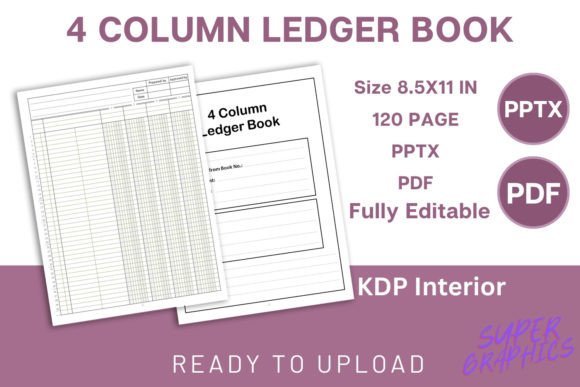
The 4 Column Accounting Ledger Book KDP is a ready-to-upload digital interior designed for use on Amazon KDP and similar platforms. It comes as a ZIP file containing an editable PowerPoint (PPTX) source file and a high-resolution PDF interior that is print-ready. The PDF is formatted for a trim size of 8.5 x 11 inches and spans 120 pages. The ledger uses a four-column layout for recording debits, credits, balances, and descriptions, making it suitable for basic to moderate bookkeeping needs.
What sets this product apart is that it is entirely digital. No physical item is shipped. Instead, you receive files that you can upload directly to KDP, print at home, or send to a print-on-demand service. This flexibility makes it an attractive option for content creators, small business owners, or anyone who needs a practical ledger without the hassle of designing one from scratch.
Who Needs a 4-Column Ledger, and Why?
Financial tracking is not just for accountants. Many people find themselves needing a simple way to record transactions, but they may not have the time or desire to learn complex software. Here are some common situations where a 4 Column Accounting Ledger Book KDP becomes useful:
- Freelancers and independent contractors who need to track invoice payments, expenses, and outstanding balances.
- Small business owners who prefer a physical backup to digital records or who need a simple system for daily entries.
- Property managers or landlords who track rent payments, maintenance costs, and deposits.
- Nonprofit treasurers who manage membership dues, donations, and event expenses.
- Individuals who want a clear picture of their personal cash flow without relying on spreadsheets or apps.
The challenge many face is that digital tools can feel overwhelming or impersonal. A physical ledger provides a tactile, focused way to record data. It does not require batteries, internet access, or software updates. For those who want to unplug and still stay on top of their finances, a printed ledger is a reliable option.
How the 4 Column Accounting Ledger Book KDP Addresses Common Pain Points
One of the biggest hurdles in bookkeeping is consistency. People start with good intentions, but without a structured format, entries become messy and incomplete. The 4 Column Accounting Ledger Book KDP solves this by providing a clear, repeatable layout. Each page is designed so that you can record the date, description, debit, credit, and running balance. This structure encourages you to enter data in a logical order, reducing errors and omissions.
Another common issue is legibility. Handwritten ledgers can become chaotic if the columns are too narrow or the spacing is inconsistent. With a high-resolution interior and a professional layout, this product ensures that your entries remain readable over time. The 8.5 x 11 inch trim size offers ample space for writing, so you are not cramped for room.
For content creators and entrepreneurs who publish on KDP, the editable PowerPoint file is a significant advantage. You can customize the interior before uploading—adjust column widths, add your branding, or modify the header style. This flexibility means you are not locked into a one-size-fits-all design. You can tailor the ledger to your specific audience or use case.
Practical Applications and Real-World Outcomes
Imagine you are a freelance graphic designer who manages multiple clients each month. You need to track invoices sent, payments received, and any expenses related to software subscriptions or hardware. Using the 4 Column Accounting Ledger Book KDP, you can set up a page for each client or a running log for all transactions. At a glance, you can see who has paid, who still owes, and what your net income is for the month. This clarity helps you make informed decisions about cash flow and tax planning.
For a small retail business, the ledger can be used to record daily sales, supplier payments, and operating expenses. By keeping a running balance, you can quickly identify discrepancies or spot trends. For example, if your expenses suddenly spike in one category, you can investigate and adjust your spending.
Nonprofit organizations often need to demonstrate transparency to donors and board members. A well-maintained ledger provides a clear audit trail. The four-column format makes it easy to separate restricted funds from general operating funds, ensuring that money is used appropriately.
Even for personal use, the benefits are tangible. Tracking your monthly income and expenses in a physical ledger gives you a sense of control. You can see where your money goes and make adjustments. Over time, this habit can lead to better savings, reduced debt, and greater financial confidence.
How Different Users Can Approach This Ledger
Not everyone will use the 4 Column Accounting Ledger Book KDP in the same way. Understanding how different users might adapt it can help you get the most out of the product.
The Small Business Owner
If you run a business, you may want to assign one page per account or category. For example, you could dedicate pages to office supplies, utilities, payroll, and client payments. This approach makes it easy to total each category at the end of the month. The 120-page count gives you plenty of room to cover multiple categories over a quarter or longer.
The Freelancer or Side Hustler
For freelancers, simplicity is key. You might use one page per month and record all transactions chronologically. At the end of each month, you can total your income and expenses. This method gives you a snapshot of your monthly performance without overcomplicating things.
The Content Creator or Publisher
If you are uploading this interior to KDP, you have the opportunity to brand it. Using the editable PPTX file, you can add your logo, change the cover design, or adjust the column headers to match your niche. For example, you could rename the columns to fit a specific audience, such as "Date, Client, Invoice Amount, Payment Received, Balance." This customization can make your listing stand out and attract a targeted audience.
The Personal Finance Tracker
For personal use, you might track multiple accounts in one ledger. Use a separate section for your checking account, savings, and credit card payments. The running balance column helps you see your overall financial position at any point.
Recommendations for Getting Started
To make the most of the 4 Column Accounting Ledger Book KDP, consider these practical tips:
- Set a routine. Decide a regular time each day or week to update your ledger. Consistency is more important than quantity. Even five minutes a day can keep your records current.
- Keep it simple. Do not overcomplicate your categories. Start with broad groups like Income, Expenses, and Transfers. You can add detail later if needed.
- Use the running balance. The fourth column is arguably the most powerful. By keeping a running balance, you always know where you stand. This can prevent overdrafts or overspending.
- Back up your data. While the ledger is physical, consider taking photos of each page once a month. This gives you a digital backup in case the book is lost or damaged.
- Customize before printing. If you are using the editable PPTX file, take time to adjust the layout to suit your needs. Change column widths, add a header row, or include a space for notes. A small upfront investment of time can save you frustration later.
Important Considerations Before You Download
Because this is a digital product, there are a few things to keep in mind. First, you will not receive a physical book in the mail. The ZIP file contains the files you need to produce your own copy. Second, ensure that your software can open PPTX files if you plan to edit. Most modern presentation tools, including Google Slides, can handle this format. Third, verify your printer settings if you are printing at home. The 8.5 x 11 inch size is standard, but you may need to adjust margins or scaling to get the best result.
If you are uploading to KDP, the PDF interior is already formatted for that platform. You can upload it directly without additional adjustments. The 120-page count gives you a substantial book that feels valuable without being overwhelming. The high-resolution interior ensures crisp text and clean lines, which is important for a professional finish.
Outcomes You Can Expect
Users who commit to using this ledger consistently report several positive outcomes. They feel more organized and less anxious about their finances. They can answer questions about their income or expenses without digging through piles of receipts. Business owners find it easier to prepare for tax season because their records are already structured. Freelancers can see which clients are reliable payers and which ones need follow-up.
Perhaps most importantly, a physical ledger creates a sense of accountability. When you write down a transaction, you are more likely to remember it and reflect on it. This mindfulness can lead to smarter financial decisions over time.
Final Thoughts
The 4 Column Accounting Ledger Book KDP is more than just a file—it is a tool for building better financial habits. Whether you are publishing it on KDP, using it for your own records, or customizing it for a client, the design is built around clarity and ease of use. The four-column structure is time-tested and versatile, making it suitable for a wide range of bookkeeping tasks.
If you are looking for a practical way to track income and expenses without relying on complicated software, this ledger offers a straightforward path. By providing both an editable source file and a print-ready PDF, it gives you control over the final product. Take a few minutes to consider how you will use it, set up your categories, and start recording. Over time, you will likely find that the simple act of writing down your transactions brings a level of clarity that digital tools sometimes cannot match.
Thank you for your interest in the 4 Column Accounting Ledger Book KDP. Whether you are a publisher, a business owner, or someone who simply wants better financial records, this interior is designed to help you achieve your goals.