Laser Cut Files for Round Wooden Box Projects
A well-crafted wooden box does more than hold objects — it carries intention, memory, or a brand message. For makers and designers, the search for a precise, adaptable template often ends with a set of laser cut files DXF SVG round wooden box designs. These digital files open up a world of creative production, whether you are building inventory for a shop, preparing a workshop project, or prototyping a gift line. The appeal lies in the combination of precision and flexibility: a high-resolution vector file that works across machines and software, allowing you to focus on material choice and finishing rather than redrawing geometry from scratch.
What Makes This Set of Files Useful
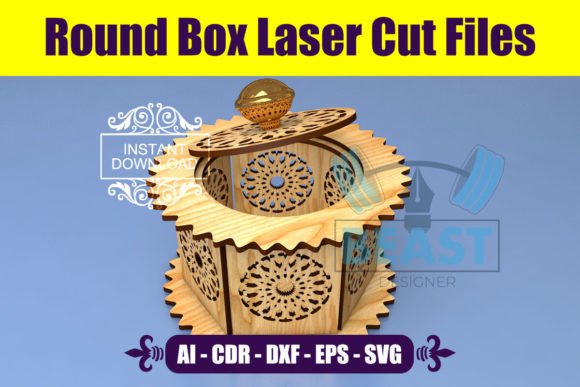
This particular collection provides everything needed to cut a round wooden box using a laser cutter. The package includes a zip archive containing DXF, SVG, CDR, AI, and EPS formats, so compatibility is rarely an issue. The file is built at 300 DPI in RGB, using only black lines — a standard that ensures clean vector recognition across laser software like LightBurn, LaserGRBL, or RDWorks. The material recommendation is 3mm stock, which is widely available in plywood, MDF, or acrylic.
What makes this product stand out is the thought given to workflow. Instead of spending time converting formats or cleaning up stray nodes, you can import directly into your preferred software and begin test cuts. The round geometry also simplifies assembly: a circular box with interlocking tabs or press-fit joints requires fewer clamps and less glue than complex polygonal shapes. For anyone running a small production batch or teaching a class, that efficiency matters.
Creative Possibilities for Round Wooden Boxes
A round box feels different from a square one. It suggests something curated, perhaps precious. Here are several directions you can take this basic form to create products that resonate with different audiences.
Jewelry and Keepsake Storage
The most obvious application is a small jewelry box. A round lid that lifts off or hinges open offers a satisfying reveal. You can engrave the top with a monogram, a botanical motif, or a geometric pattern. For a wedding favor or bridal party gift, line the interior with felt or velvet before assembly. The 3mm walls give enough structure while keeping the box lightweight and portable. If you sell on marketplaces like Etsy, offering customization — a name, a date, a short quote — adds perceived value without requiring a separate file version.
Tea and Spice Containers
Food-safe finishes turn a round wooden box into an attractive container for loose-leaf tea, dried herbs, or spice blends. Because the shape is symmetrical, you can stack several boxes in a crate set. Consider adding a small engraved label on the lid with the blend name. If you design for a line of artisanal food products, the box becomes part of the brand experience, not just packaging. The round form also seals better than a square box when fitted with a simple groove, keeping contents fresh longer.
Desk Organizers and Small Parts Storage
Not every box needs to be decorative. A set of round containers on a desk or workbench holds paper clips, USB drives, buttons, or craft supplies. The uniform shape makes them easy to group in a tray or drawer. You can vary the height of the box by scaling the side wall in your software while keeping the lid and base dimensions constant. This approach gives you a modular system without creating separate files for each size.
Adapting the Design for Different Users
Different makers will approach this file with different goals. Here is how to tailor the same vector set for specific outcomes.
For the Hobbyist or Weekend Maker
If you are working from a home workshop with a diode laser, you may need to test different power and speed settings. Use the SVG file to run a small proof-of-concept cut on scrap material. Focus on getting a tight fit between the lid and the body. Slight adjustments to the kerf compensation in your laser software can make the difference between a wobbly lid and a satisfying press-fit. Once you dial in the settings, you can batch-cut several boxes in an afternoon. The round shape minimizes waste compared to irregular designs, and offcuts can become coasters or labels.
For the Small Business Owner or Designer
When you are producing for sale, consistency is everything. The DXF format imports reliably into most CAD programs, and the AI file works seamlessly with Adobe Illustrator for adding logos or decorative engraving. To differentiate your product line, consider the following variations:
- Layered lids: Cut two thin rings and sandwich a contrasting wood or acrylic disc for a two-tone effect.
- Engraved patterns: Fill the top with a radial design or a repeating geometric motif.
- Custom inserts: Add an inner ring to hold a tea light candle or a small vial.
- Branded bases: Engrave your business name or a care instruction on the bottom.
These adaptations cost little to implement but create a product that feels deliberate and exclusive.
For Educators and Workshop Leaders
A round wooden box project teaches several core skills: reading vector files, understanding material thickness, setting laser parameters, and assembling press-fit joints. The simple geometry lowers the barrier for beginners. You can provide the SVG file to students and ask them to design their own lid engraving. The project fits a two-hour session if you pre-cut the box parts and let participants focus on engraving and assembly. Because the design uses 3mm material, it is forgiving enough for first-time users who may still be learning to calibrate their machines.
Practical Recommendations for Clean Results
Getting a professional finish from a laser cut file depends on more than the vector itself. Here are actionable steps to keep your results consistent.
Check your material thickness. The file is designed for 3mm stock, but plywood and MDF can vary by several tenths of a millimeter. Measure your material with calipers and adjust the design using a scaling factor if needed. Many laser software packages allow you to offset the cut path slightly to account for kerf width. Test on a small piece before committing to a full sheet.
Use black lines only. The file is supplied in pure black RGB (0,0,0) to ensure that your laser software recognizes it as a cut line. Do not change the stroke color. If you import the file into a design program, keep the lines as strokes rather than converting them to fills. Filled shapes often read as raster engrave areas, which could ruin a cut by burning through the material in the wrong places.
Organize your layers. If you plan to add engraving, separate cut and engrave elements into different layers in your software. Name them clearly (e.g., "Cut" and "Engrave") so you can assign different power and speed settings without confusion. This habit becomes essential when you scale up production and need to run the same job multiple times.
Prepare the workspace. Round boxes have curved edges that may shift slightly during assembly. Use a clamping jig or a simple wooden frame to hold the sides in place while the glue sets. If the design uses interlocking tabs, test the fit after cutting and sand any tight spots with fine-grit sandpaper. A light coat of mineral oil or beeswax finishes the wood and protects the surface from fingerprints.
Keeping Your Work Consistent and Original
When you produce multiple units, small variations can add up. To maintain uniformity across a batch, cut all identical parts from the same sheet of material whenever possible. Wood grain, density, and moisture content vary between sheets, and even a slight difference can affect how the laser interacts with the surface. By cutting all bases from one sheet and all lids from another, you reduce the chance of color or texture mismatch.
Originality does not require reinventing the form. The round box is a classic shape that customers recognize and trust. Your unique value comes from the finishing choices you make: the wood species you select, the engraving art you apply, the interior lining you add, and the packaging you wrap it in. The file provides the foundation; your craft provides the distinction.
Final Thoughts on This Digital Product
Purchasing a set of laser cut files DXF SVG round wooden box templates is an investment in time saved. Instead of drafting a box from scratch, you can focus on the parts of the process that benefit most from human attention: material selection, finishing technique, and creative embellishment. Whether you are fulfilling a custom order, teaching a skill, or exploring a new product category, this file gives you a reliable starting point. If you have questions about scaling, material choices, or adapting the design for a specific machine, do not hesitate to reach out. Following the shop is a good way to stay informed about future releases — new formats and variations are added based on feedback from the community that uses them.
Keep the file organized on your drive, run a test cut on scrap material first, and build from there. A round wooden box might be a simple object, but in the hands of a thoughtful maker, it becomes much more.