Password Logbook KDP Interior Template for Secure Organizing
If you have ever struggled to remember which login credentials belong to which account, or found yourself resetting passwords more often than you would like, you are not alone. A dedicated password logbook offers a practical offline solution, and the Password Logbook KDP Interior Template provides a ready-to-use foundation for creating a professional, printable logbook that helps anyone keep their digital accounts organized. Whether you are a freelancer juggling multiple client portals, a small business owner managing team logins, or simply someone who values security, this template simplifies the process of producing a high-quality password journal for Amazon KDP or personal use.
Understanding the Purpose of a Password Logbook Interior Template
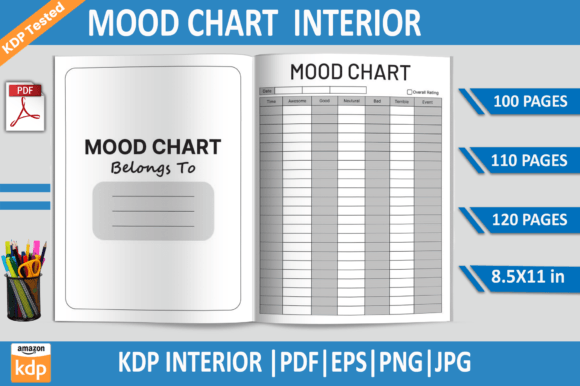
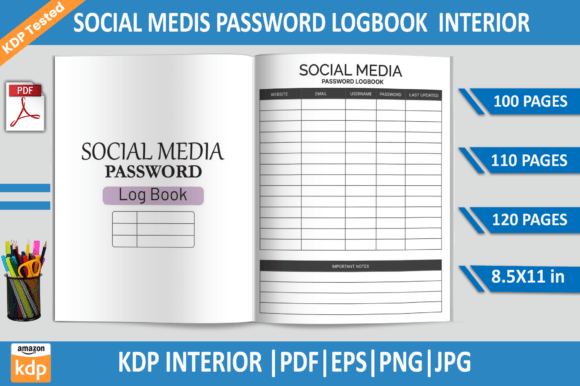
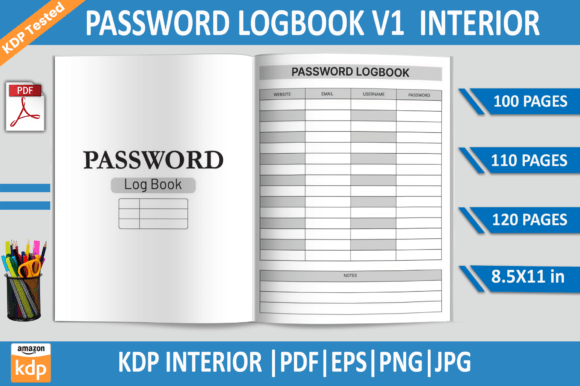
At its core, the Password Logbook KDP Interior Template is a pre-designed file set that allows you to generate a password keeper notebook, journal, or diary without starting from scratch. It includes multiple PDF files with varying page counts—100, 110, and 120 pages—as well as editable EPS files, transparent PNGs, and high-resolution JPGs. The template is optimized for an 8.5x11 inch trim size at 300 DPI, with a bleed and no bleed option, and has been tested on Amazon KDP to ensure print-ready quality. This means you can upload the files directly to KDP or print them at home with confidence that formatting, margins, and resolution meet publishing standards.
The template is designed for Adobe Illustrator, so if you are comfortable with vector editing, you can customize colors, layout elements, or even add your own branding. For those who prefer a straightforward approach, the print-ready PDF files require no editing at all—just download and upload. This flexibility makes the template equally valuable for creators who want to sell their own password logbook on Amazon and for individuals who simply need a reliable personal organizer.
Why a Password Logbook Matters in Everyday Life
In an era of countless online accounts—email, banking, social media, streaming services, work platforms, shopping sites—remembering every unique password is nearly impossible. Many people resort to reusing passwords or storing them in insecure notes on their phone, which increases the risk of data breaches. A physical password logbook provides a secure, offline alternative. By writing down credentials in a dedicated book that you keep in a safe place, you reduce reliance on memory and digital storage while maintaining control over your information.
The Password Logbook KDP Interior Template supports this need by offering structured pages where you can record website names, usernames, passwords, security questions, and notes. The consistent layout makes entries easy to find, and the professional design encourages regular use. For beginners who may have never used a password journal before, the template removes the guesswork of creating a usable format from scratch.
For Creators and Entrepreneurs Selling on KDP
If you publish low-content books on Amazon KDP, this template is a time-saver. Since it has already been KDP tested, you avoid common pitfalls such as incorrect bleed settings, low resolution, or files that fail Amazon's upload requirements. You can produce a password logbook under your own brand with minimal effort. The inclusion of multiple PDF page counts (100, 110, and 120 pages) lets you offer different versions or price points. The editable EPS file gives you the freedom to adjust headers, add your logo, or change fonts to match your style. For anyone starting a print-on-demand business, this template provides a solid, ready-to-publish product.
For Freelancers and Remote Workers
Freelancers often manage logins for multiple clients—project management tools, shared drives, communication apps, and billing systems. Keeping track of these credentials securely is essential. Using a password logbook printed from this template allows you to store each client's information separately and update entries as needed. The high-quality print format (300 DPI, 8.5x11 inches) ensures the text remains crisp and easy to read, even when you add handwritten notes in pen. The no-bleed version is perfect for home printing, while the bleed version is suitable for professional printing services.
For Small Business Owners and Teams
Small business owners often share access to company accounts with employees or contractors. A central password logbook, kept in a secure location, can serve as a reference for authorized personnel. The template's clear structure makes it easy to designate which entries are for business use. The JPG and PNG files also allow you to create digital copies for personal backup, if you prefer to store scanned images offline. The transparent background PNG is particularly useful if you want to superimpose the logbook design onto other documents or covers.
For Educators, Bloggers, and Marketers
Educators and content creators frequently manage multiple platform accounts—learning management systems, social media channels, email lists, and analytics tools. A password logbook helps reduce the mental load of remembering every credential. The template's uniform layout means you can quickly flip to the right page and locate the information you need. Because the template is available in high-resolution JPG and EPS formats, you can also use it as a reference for creating digital resources or tutorials about password management.
Key Features That Add Value
- Multiple page count options: Choose between 100, 110, or 120 pages depending on how many entries you anticipate. This flexibility lets you create a slim, portable logbook or a more comprehensive volume.
- Print-ready PDF files: The PDFs are formatted for instant download and direct upload to Amazon KDP. No extra formatting or adjustment is needed, which is ideal for beginners.
- Editable EPS file: If you use Adobe Illustrator, you can modify colors, fonts, and layout elements to match your personal or brand style. This makes the template suitable for creating a unique product.
- Transparent background PNG: Useful for incorporating the design into other projects, such as covers, inserts, or digital planners.
- High-resolution JPG files: These provide a quick preview option and can be used for marketing materials or sample pages.
- 300 DPI quality: Ensures sharp, professional-looking text and graphics when printed, whether at home or through a commercial printer.
- Bleed and no bleed options: Accommodates different printing needs. Bleed is essential for full-bleed printing where ink extends to the edge of the page; no bleed works well for simple, bordered layouts.
- KDP tested: The files have been verified to meet Amazon's specifications, reducing the risk of rejection during upload.
Important Considerations Before Choosing This Template
While the Password Logbook KDP Interior Template is versatile and beginner-friendly, there are a few things to keep in mind. First, the template is designed for 8.5x11 inch pages, which is a standard US letter size. If you plan to sell internationally through KDP, ensure that this size works for your target market or that you are prepared to adjust the files accordingly. The EPS file is editable in Adobe Illustrator, so if you do not have access to that software, you will rely on the pre-made PDFs, PNGs, and JPGs—which are still fully functional but offer less customization.
Consider how you intend to use the logbook. For personal use, the no-bleed PDF is convenient for home printing. For commercial sale on KDP, the bleed version is typically preferred. The 300 DPI resolution means the files are larger in size, so ensure you have adequate storage and a stable internet connection for downloading. Also, although the template is KDP tested, it is always wise to preview your upload on Amazon's platform before publishing to catch any unexpected formatting shifts.
For those new to print-on-demand, remember that a password logbook is a low-content product, so your cover design and listing optimization will play a significant role in attracting buyers. The interior template handles the pages, but you will need to create or source an appealing cover separately. If you are using the template for your own personal organization, you can simply print it and bind it however you prefer—three-ring binder, spiral binding, or even a simple folder.
Realistic Use Cases and Everyday Applications
Imagine you are a freelance graphic designer with accounts at several project management platforms, file-sharing services, and client communication tools. Instead of relying on a browser's autofill feature (which can be unreliable across devices), you open your password logbook and quickly find the credentials for each service. The structured layout of the Password Logbook KDP Interior Template makes this process efficient because each page has dedicated fields for the website, username, password, and notes. You can also add security question prompts if needed.
Another scenario: a small business owner wants to provide a password reference for their part-time assistant. Rather than sharing sensitive information over email or text, they hand over a printed logbook with only the relevant entries visible. The professional appearance of the template lends credibility and encourages careful handling of the information. If the assistant later leaves the company, the logbook can be updated or replaced without compromising digital security.
For hobbyists who manage multiple online communities or forums, a password logbook printed from this template serves as a reliable backup. You may know most of your passwords by heart, but having a written record reduces the stress of potential lockouts. The high-quality print and consistent formatting mean that even after months of use, the pages remain legible and intact.
Making the Most of the Template
To get the best results from the Password Logbook KDP Interior Template, start by deciding which file format meets your immediate needs. If you plan to sell on KDP, use the PDF with bleed and upload it directly. If you are printing for yourself, the no-bleed PDF or even the JPG files can be printed at home or at a local print shop. For those who enjoy customizing, open the EPS file in Adobe Illustrator and adjust the color scheme, add your own header text, or include a personal logo. The transparent PNG is handy if you want to create digital versions for use in note-taking apps like GoodNotes or Notability, though the template is primarily designed for print.
Keep in mind that a password logbook is most effective when kept in a secure, private location. Treat it like a valuable document—store it in a drawer, safe, or locked cabinet. Do not carry it in public view or leave it on your desk. The template's clean, unassuming design does not advertise its contents, which adds a layer of discretion.
Final Thoughts on the Password Logbook KDP Interior Template
Whether you are a seasoned KDP publisher looking for a tested interior, a busy professional seeking a simple offline password solution, or a beginner curious about print-on-demand, this template offers a practical starting point. Its multiple file formats, tested quality, and straightforward layout make it accessible to a wide audience. By using the Password Logbook KDP Interior Template, you save time, reduce errors, and produce a finished product that looks polished and works reliably. For anyone who values organized, secure password management, this template turns a good intention into a usable tool.