Tasks List Planner Template: A Strategic Tool for Organised Action
Every meaningful outcome begins with a decision about what to do next. Yet between intention and execution lies a messy middle of competing priorities, forgotten deadlines, and scattered notes. The Tasks List Planner Template exists precisely to bridge that gap. It is not merely a list of things to do. It is a structured space for making choices about where to direct your attention, when to act, and how to know when something is truly complete.
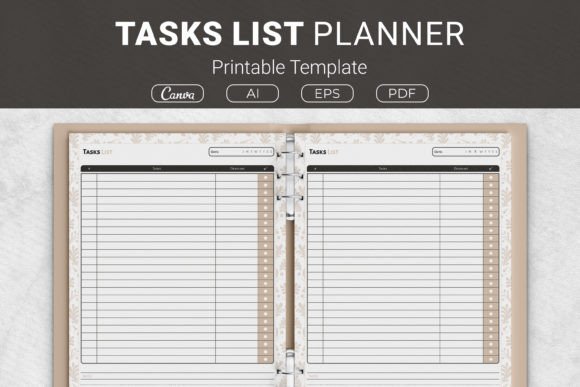
Whether you are an entrepreneur juggling product launches, a freelancer managing client work, a small business owner tracking operational tasks, or a creator mapping content deadlines, this template offers a straightforward but surprisingly versatile framework. The package includes AI Illustrator files, an EPS file, PDF files ready to print, and Canva templates accessible through provided links. Sizes range from US Letter 8.5 x 11 inches to A4 210 x 297 mm, 7.5 x 9.25 inches, and 6 x 9 inches. It also works as a KDP planner interior for Kindle Direct Publishing projects, making it suitable for both personal use and commercial publishing.
This article explores why a Tasks List Planner Template can be strategically useful, how to approach it with clear intent, and what to consider before relying on it for your daily or weekly workflow.
Why a Task List Template Matters More Than You Think
Most people treat task lists as memory aids. They write down what they remember, cross off what they finish, and hope nothing slips. That approach works in low-stakes environments. But when your work involves multiple projects, dependencies, or external deadlines, the simple act of writing tasks in a structured format becomes a decision-making tool.
The Tasks List Planner Template forces a few essential choices every time you use it. First, you must name the task clearly. That alone reduces ambiguity. Second, you assign a due date. That brings time into the equation and makes prioritisation visible. Third, you mark whether it is done. That creates a feedback loop. And the notes field allows context, links, or instructions to live alongside the task rather than in a separate email or chat message.
This structure is useful because it aligns with how adults actually work. You are not looking for motivation. You are looking for clarity. The template provides a container for that clarity, and it does so without forcing you into a rigid system like GTD or Kanban if that does not suit your style.
Strategic Uses Across Different Contexts
A Tasks List Planner Printable Template can serve different strategic purposes depending on your role and goals. Here are several scenarios where thoughtful use of this template supports better outcomes.
For Entrepreneurs and Small Business Owners
When you run a business, tasks multiply quickly. There are client deliverables, marketing activities, admin work, financial checks, and team coordination. Writing everything in one place often leads to overload. The template helps you separate tasks by due date and completion status, which makes it easier to decide what needs your attention today versus what can wait.
Consider using one page per week. List all tasks that must happen that week. Add due dates realistically. Use the notes field to record any client preferences, special instructions, or follow-up reminders. At the end of the week, review which tasks remain undone and decide whether they need to move to next week or be dropped. This simple habit prevents tasks from accumulating silently and reduces the cognitive load of keeping everything in your head.
For Freelancers and Creators
Freelancers often manage multiple clients, each with their own deadlines and deliverables. A single task list can quickly become chaotic. Use the template to group tasks by client or project. Write the client name or project code in the notes field, or use different templates for different workstreams if you prefer separation.
The due date column becomes your primary decision tool. When a new request comes in, ask yourself whether it fits within the existing deadlines. If not, you have a clear reason to renegotiate the timeline. This protects your boundaries and your reputation. The Tasks List Planner Template thus becomes a communication tool as much as a planning tool.
For Educators and Professionals
If you are an educator, you likely have lesson planning, grading, meetings, and professional development tasks all competing for your time. The template allows you to separate these categories physically or by using the notes field. Marking tasks as done gives a sense of progression that is often missing in knowledge work.
Professionals in corporate roles can use the template to track project milestones, follow-up actions from meetings, and personal development goals. The act of writing a due date and then checking it off creates accountability. Even if no one else sees your list, you are reinforcing a habit of follow-through.
How to Approach the Template Intentionally
The value of a Tasks List Planner Printable Template depends almost entirely on how you use it. Using it without clear goals is like having a map without knowing your destination. You will still move, but you may not arrive where you intended.
Start With a Purpose
Before you write the first task, ask yourself what you want this list to achieve. Is it a daily running list? A weekly planning sheet? A project tracker? The template works for all these, but each requires a different mindset. For daily use, focus on tasks that must be completed that day. For weekly use, list everything that needs to happen and then prioritise. For project tracking, use one template per project and update it as milestones shift.
Be Specific About the Task
Vague tasks lead to vague outcomes. Instead of writing "work on proposal," write "draft budget section of proposal for client X." Instead of "follow up," write "email Y about Z by noon Wednesday." The more specific the task, the easier it is to start. The Tasks List Planner Template gives you a dedicated line for each task, so use that space to capture the essential action.
Use the Due Date as a Decision Point
A due date is not just a deadline. It is a signal about priority. If everything has a due date of tomorrow, nothing is truly urgent. Use the date to differentiate between tasks that require immediate action and those that can simmer. This is especially important when you use the template for KDP projects or other publishing work where multiple tasks depend on each other.
The Notes Field Is Underrated
Many people ignore the notes column or use it only for afterthoughts. Instead, use it proactively. Write a quick link to a resource. Note a dependency: "waiting on feedback from Jane." Record a specific instruction you might forget. The notes turn a simple list into a lightweight project management system. Over time, this reduces the need to switch between apps or dig through emails to find context.
Practical Examples of Using the Template
Let me walk through a realistic example to illustrate how the template works in practice.
Imagine you are a small business owner preparing a product launch. Your tasks for the week might include:
- Finalise product description (due Monday)
- Send samples to reviewer (due Tuesday)
- Update website with new product (due Wednesday)
- Write email campaign (due Thursday)
- Review analytics from last launch (due Friday)
You write these in the Tasks List Planner Template, each with a due date. In the notes field for the first task, you write "include specs and pricing." For the second, "address and courier details." For the third, "check mobile view." As you complete each task, you mark it done. On Friday, you review what remains. If the analytics review is still open, you decide whether to push it to next week or drop it. This simple loop keeps the launch on track without requiring a complex tool.
Another example: a freelance writer managing three clients. You might list tasks by client, using the notes field to indicate client name. You set due dates based on agreed deadlines. When a fourth client asks for a rush job, you can see immediately that your week is full. You respond with a realistic timeline, using your template as evidence. This strengthens your professional credibility.
Possible Risks and When to Be Cautious
No tool is risk-free, and the Tasks List Planner Printable Template is no exception. The most common risk is using it without clear goals or context. If you fill the template with random tasks that do not align with your priorities, you will feel busy but make little progress. The list becomes a source of anxiety rather than clarity.
Another risk is treating the template as a one-time exercise. If you complete a page and never review it, you lose the feedback loop that makes the template useful. The act of marking tasks done is not just about satisfaction. It is about learning which estimates were accurate, which tasks were unnecessary, and where your time actually went. Without review, you repeat the same patterns.
There is also a risk of overloading the template. A single page can hold maybe 10 to 15 tasks before it becomes overwhelming. If you have more tasks than that, consider using multiple templates for different areas of your life or work. The Tasks List Planner Template is a tool for focus, not for capturing everything you might ever do.
Finally, if you use the template for KDP projects, be careful about formatting. The PDF and Canva versions are ready to print, but if you plan to publish the interior as a planner, ensure the layout matches your audience's expectations. The template is designed to be simple, which is a strength, but simplicity requires clarity in execution.
Long-Term Value and Integration Into Your Workflow
The true value of a Tasks List Planner Template appears over time. When you use it consistently, you build a record of your decisions. You can look back at completed pages and see what you prioritised, what you finished, and what you postponed. This is valuable data for planning future projects and for understanding your own work patterns.
If you print the template and keep it in a binder, you create a physical archive. Some people find this more satisfying than digital lists because it reduces screen time and provides a tangible sense of progress. Others prefer the Canva template because it integrates with their digital workflow. Both approaches work, as long as you use the template with intention.
For those interested in publishing, the KDP-ready formats open a commercial opportunity. You can use the Tasks List Planner Template as part of a larger planner or sell it as a standalone interior. The multiple sizes (US Letter, A4, 7.5 x 9.25 in, 6 x 9 in) make it adaptable to different book formats. The AI and EPS files give you flexibility to customise the design if you want to create your own version.
Final Considerations Before You Start
Before you download and print the Tasks List Planner Printable Template, take five minutes to reflect on what you actually need. Are you looking for a daily checklist? A weekly planning sheet? A project tracker? The template can serve all these purposes, but you need to decide which one matters most right now.
Start small. Use one template for one week. At the end of the week, review it. Ask yourself what worked and what did not. Then adjust. Maybe you need more space for notes. Maybe you want to add a priority column. The template is simple by design, but you can adapt it to your context by how you use it.
Remember that the goal is not to fill every line. The goal is to complete the tasks that matter. The Tasks List Planner Template is a means to that end, not the end itself. Use it to support your decisions, not to replace them.
If you are an entrepreneur, freelancer, educator, or anyone with multiple responsibilities, this template can help you move from overwhelmed to organised. The structure is minimal, which is exactly why it works. It gives you just enough framework to capture what needs doing, when it needs doing, and whether it is done. Everything else is up to you.